Lorca iOS: local model assistance inside a UIKit note
For my CodePath iOS capstone, I brought the note-writing experience from Lorca on macOS into a small native iOS app. The main interaction is a page I can keep writing on while a local model helps develop individual passages.
The implementation uses UIKit and Storyboard throughout. It has a white writing canvas, a serif Notes heading, a New note control, saved notes behind a list icon, and connection settings in the corner. I kept the project small enough to download, open in Xcode, and run in Simulator without installing app dependencies.
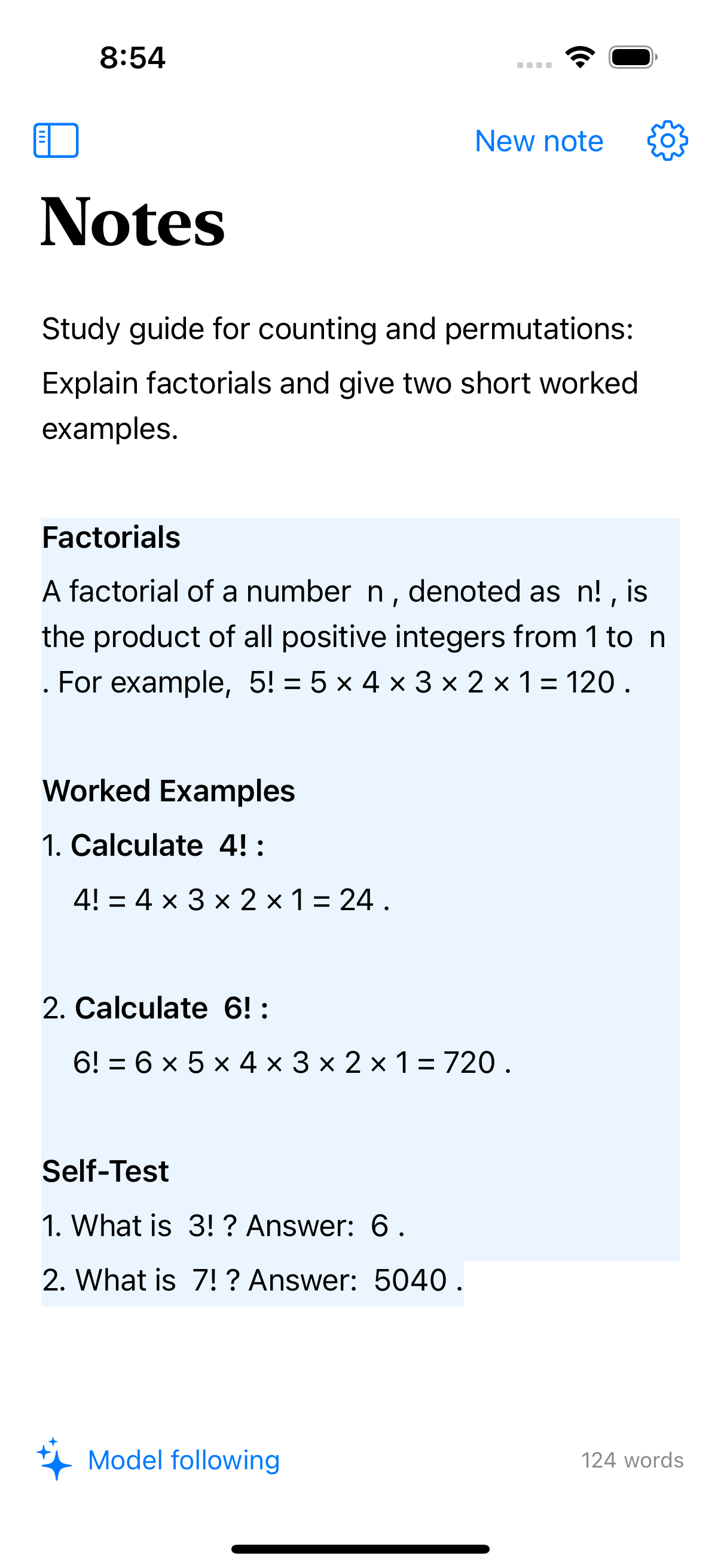
Keep writing on the page
I can write a heading such as “Study guide for counting and permutations,” add what I need explained, and move to another paragraph. Once a passage settles, the app asks the model for a structured contribution. Three small pulsing dots appear in the margin beside that passage while it works. The dots are a view over the editor, so they never become saved note content or an undo step.
The response appears below my original text with a blue background. I can edit it directly. My changes appear amber, and editing a generated block removes its blue highlight. A later model addition receives its own blue highlight. Undo and redo use the native editor rather than a separate chat transcript.
For task lists, I keep my rough writing and get a checkable list below it. Checked items move beneath unfinished ones. There is also screenshot import through the system photo picker: Apple’s Vision framework recognizes the text, which the local model can summarize. This is text recognition, not a claim that the app understands every image.
UIKit, Storyboard, and a small model loop
The three main scenes are the note editor, saved-note list, and connection settings. Storyboard owns the scene structure and Auto Layout. A native UITextView handles selection, typing and editable attributed text. UITableView handles saved notes, search, rename and confirmed deletion. Connection settings and alerts stay native too.
The model loop works with settled passages and bounded local context. It rejects stale work when the source changes and offers pause and retry controls. Model output is validated before insertion. There is no model-generated command execution in this app.
Notes persist as atomic local JSON with rich-text data and the ranges needed to distinguish generated content from human edits. Reopening the app restores the selected saved note. This persistence is separate from model memory; it does not train a model or synchronize the macOS library.
Run it on one Mac
The submission is designed for Xcode Simulator and Ollama on the same Mac:
- Install and open Ollama.
- Run
ollama pull qwen3:4bto download the smaller model option. - Open
ios/LorcaIOS.xcodeproj, choose the LorcaIOS scheme and an iPhone Simulator, then Run. - In the app’s gear menu, set
http://127.0.0.1:11434and the exact installed model name, then Test & Connect.
No physical phone, signing team, pairing service or desktop Lorca installation is needed for this setup. Inference runs on the Mac; it is not an on-device iPhone model. The repository README includes the full setup and troubleshooting steps.
Ordinary notes work without a server. Model assistance needs Ollama. Requests for current information can use Exa search, which needs internet access and sends a search query outside the Mac. The app does not promise that every feature is entirely offline.
What changed during the capstone
Milestone 1 proposed a phone-to-Mac chat companion. I narrowed the final product around notes and made Simulator localhost the instructor’s run path. The repository preserves the original planning, hand sketch, digital wireframes and earlier videos, alongside the revised feature checklist and sprint update.
I checked the build and a real local-model flow on an iPhone 16 Pro Simulator running iOS 18: connection, inline generation, passage progress and saved-note reopening. A focused check also covered opening the editor and restoring typing after Done. There is more to test across device sizes and accessibility settings; I am not claiming exhaustive coverage or a physical-device run.
Calendar export, desktop synchronization, authenticated phone pairing and iMessage remain outside this version. The final demo recording is the remaining submission step. The useful result is already a small native note editor where I can keep my own writing and work with model additions in place.